URL restrictions decide which pages of a domain the Blue Tracely script collects visitors on. Use them to leave out pages that rarely bring buyers, such as careers or login pages, or to collect only on the pages that matter most. Pages the script doesn't collect on use no credits.
URL restrictions are available on every plan. Owners and admins can change them.
How URL entries are matched
Each entry is a path that starts with /, such as /pricing. Blue Tracely compares it with the path of the page the visitor is on, ignoring upper and lower case. How it matches depends on the entry's length:
- Entries longer than 3 characters match anywhere in the path.
/blogmatches/blog,/blog/my-first-postand/en/blog. - Entries of 3 characters or fewer must match the whole path.
/matches only the home page, not/about.
Only the path counts. The domain and anything after a ? in the address are ignored.
Wildcards aren't supported. An entry such as /faq/* is looked for literally. Enter /faq instead, which already matches every page under it.
Limitations
- Each list holds up to 100 entries.
- An entry can be up to 81 characters long, including the leading
/. - An entry can't contain spaces,
?or=. - URL restrictions are set for each domain. A domain's settings apply to its pages at
https://<domain>andhttps://www.<domain>.
Setting up URL restrictions
URL restrictions are in Visitor capture settings on the Script page. If your account has more than one domain, first choose the domain under Capture settings for.
Under URL restrictions, choose one of two options. Each option keeps its own list, so switching between them doesn't delete the entries of the other.
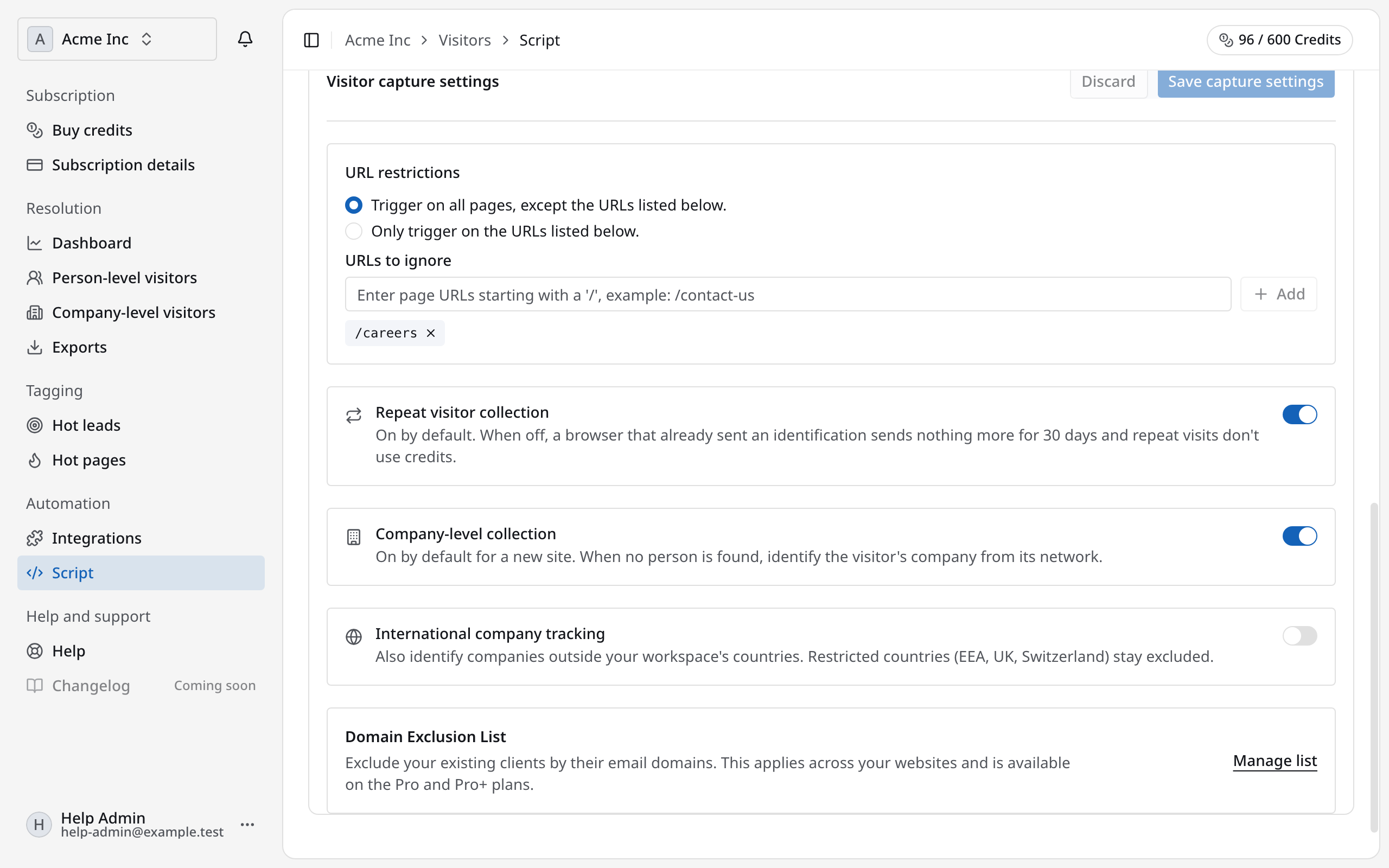
Option 1: "Trigger on all pages, except the URLs listed below."
The script collects on every page where it's installed, except the pages that match your list.
- Select Trigger on all pages, except the URLs listed below.
- Under URLs to ignore, enter a path, such as
/careers, and press Enter or select Add. - Repeat for each page you want to leave out.
- Select Save capture settings.
To remove an entry, select the x next to it, then select Save capture settings. With no entries, the script collects on every page.
Option 2: "Only trigger on the URLs listed below."
The script collects only on the pages that match your list.
- Select Only trigger on the URLs listed below.
- Under URLs to trigger on, enter a path, such as
/pricing, and press Enter or select Add. - Repeat for each page you want to collect on.
- Select Save capture settings.
With this option and an empty list, the script doesn't collect anywhere. The settings show "No URLs yet: the script won't run anywhere until you add one."
To undo unsaved changes, select Discard.
Best practices
Group pages under a common path
Instead of listing /blog/post-1, /blog/post-2 and /blog/post-3, add /blog. One entry covers all of them and keeps you well under the limit.
Using URL restrictions on several domains
Each domain in your account has its own URL restrictions. To use the same rules on two domains, add them to both. See Add Multiple Domains to Your Blue Tracely Account.
Not collecting on a whole subdomain
A domain collects only on https://<domain> and https://www.<domain>. Other subdomains, such as app.example.com, aren't collected on unless you add them as domains of their own. To keep a subdomain out, don't add it, and don't install the script there.
Additional troubleshooting tips
- Check your entries. Make sure each entry is part of the real page path, and that it has no wildcard.
- Check the option. Entries under URLs to ignore only apply with option 1, and entries under URLs to trigger on only with option 2.
- Remember to save. Changes apply only after you select Save capture settings.
For more help, see Troubleshooting: URL Restrictions.
Frequently asked questions
Can I set up different URL restrictions for each domain?
Yes. URL restrictions belong to each domain. Choose the domain under Capture settings for before you change them.
Do URL restrictions stop people on the Domain Exclusion List from being identified?
They're separate settings. URL restrictions decide which pages are collected on. The Domain Exclusion List leaves out people by their email domain, on every page.